
When you decide create a website, whether a WordPress blog, a small business site, or a portfolio, and searching how to create a website on Google will lead you to terms like web hosting in every article. Obviously, the question may arise; what is web hosting anyway?
When I decided to build my first website, I too used to search on Google for what web hosting is; so, you are not alone in searching for this, I was one of you.
After that, I will share which web hosting I personally use for this site (WP Holder).
In this guide, we will provide complete information about web hosting, starting with the basics. After reading this, you will clearly understand what it is, how it works, which type of hosting suits your needs, and what factors to consider when signing up.

In this article
- What Exactly Is Web Hosting?
- How Does It Actually Work?
- Domain Name vs. Web Hosting
- The Different Types of Web Hosting
- Which Hosting Type Is Right for You?
What Is Web Hosting ?
In simple terms, a web host is like a rented house or a landlord for your website. You rent space on their servers to store your website.
A web host provides web server space and bandwidth for file transfer to website owners. Usually, web hosting services charge a fee for this on a monthly or yearly basis.

Web hosting companies use powerful computers known as servers. These servers operate 24/7, These servers run 24/7, remain constantly connected to the internet, and store all your website’s files, including pages, images, videos, databases, and more.
When Visitor types your website address into their browser, that request goes to the server, which sends back your website’s files. The browser then builds the page your visitor sees.
That’s it.
How Does Web Host Work?
Web hosting is basically renting space on a computer that’s always connected to the internet, so your website can be reached by anyone, anytime.
Come, let me explain how web hosting works; you can easily understand the process by looking at the steps below.
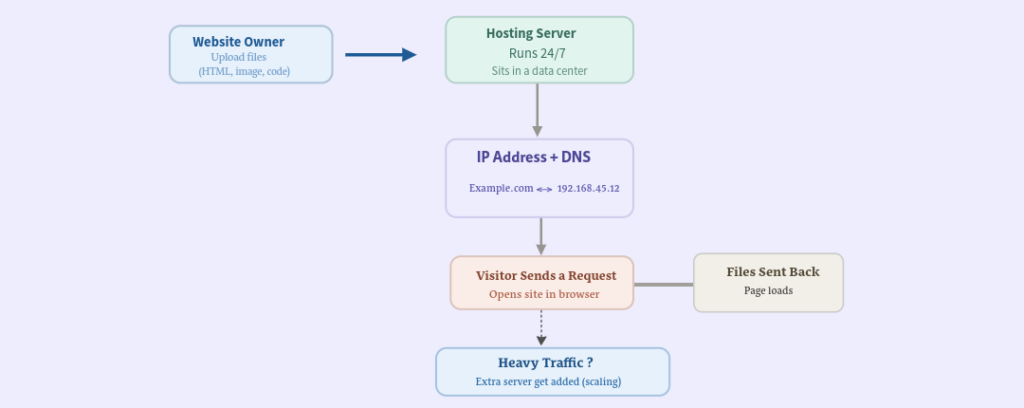
Website Owner → Hosting Server: Basically, you upload your HTML files, images, and code to a server located in a data center that runs 24/7. It is the hosting company’s responsibility to keep that machine running and connected.
Hosting Server → IP Address + DNS: Every server has a numerical IP address (192.168.45.12). Since nobody wants to type that into a browser, DNS acts as a translator, linking your human-friendly domain (example.com) to that IP.
IP Address + DNS → Visitor sends a request: When someone types “example.com,” their browser checks the DNS records, identifies the IP address, and sends a request to that server, which essentially means, “Give me your webpage.”
Files Sent Back: The server responds by sending back the requested files, and the visitor’s browser compiles them into the page that appears as it loads.
This entire process happens in under a second. Every single time.
Domain Name vs. Web Hosting
People mix these up all the time, but they are actually two different things that work together.
A domain name is the address people type into a browser to visit your website. For instance, typing wpholder.com brings you here, and Google.com takes you to Google.
Web hosting is the place where your website’s files actually reside. It is the computer (server) that stores all your images, text, and code, and displays them whenever someone visits your website. To learn more, see our guide on best web hosting for WordPress beginners.
So, to run a website, you buy a domain name to give people an address, and you buy hosting to store and display your website’s content.
No doubt you can buy these separately, but for convenience, many hosts bundle them together. You can purchase a domain from one company and host your site with another; they are entirely separate services and work well either way.
You can purchase domain names from the most popular domain registrars like Namecheap and Godaddy, and both work well.
The Different Types of Web Hosting
First, understand that not all hosting services are the same. The type of hosting you choose impacts your site’s speed, security, cost, and its capacity to handle simultaneous visitors.
A small website does not require extensive resources; it functions well even with limited storage space and bandwidth. However, a large website with high visitor traffic will require more resources to operate effectively.
Here are five main types of hosting you will encounter when making a choice.
| Hosting Type | Starting Price | Best For | Key Feature |
|---|---|---|---|
| Shared Hosting | $2.99/mo | Blogs, small business sites | Multiple sites share one server, keeping costs low |
| VPS Hosting | $4.99/mo | Growing sites, eCommerce | Your own private slice of a server, so performance stays steady |
| Managed WordPress | $2.99/mo | Popular blogs, memberships | Host handles updates, security, and backups for you |
| Cloud Hosting | $9.99/mo | Traffic spikes, scalable apps | Resources scale up or down automatically as traffic changes |
| Dedicated Hosting | $79.99/mo | Enterprise, high-traffic sites | An entire server all to yourself, with total control |
Let’s explore each type of hosting one by one so that you can choose the right hosting for your website.
1. Shared Hosting
With shared hosting, your website shares a server with hundreds, sometimes thousands, of other websites. You all share the same resources like storage, processing power, and memory.
For instance, shared hosting is like a public bus. You travel with many other passengers.
This is the cheapest option, typically costing between $2 and $10 per month. It involves a compromise on performance; if there is a sudden spike in traffic on another site hosted on the same server, your site may also slow down.
Shared hosting is a great choice for new websites with low traffic. Most beginners start here, and there is a good reason for that.
The shared hosting providers we recommend are Bluehost and Hostinger.
2. VPS Hosting
VPS hosting (Virtual Private Server) is the perfect next step when your website outgrows shared hosting. It gives you more power and space to handle growing traffic without slowing down.
A VPS provides you with a dedicated portion of a server. Even though you technically share the same physical machine with others, your portion is isolated, meaning their activities do not affect you.
For instance, VPS hosting is like a private cabin inside a train. You still share the train with other passengers, but your cabin is only yours, with your own seat and space. Even if the rest of the train gets crowded, your cabin stays comfortable and no one else can use it.
Compared to shared hosting, you get more power, greater flexibility, and better performance. It typically costs between $10 and $30 per month. Managing it usually requires some technical knowledge, although many providers offer ‘Managed VPS’ plans where they handle the technical tasks for you.
The VPS hosting provider we recommend is Bluehost.
3. Managed WordPress
Managed WordPress hosting is a specialized service built specifically for WordPress, where the hosting company handles everything related to WordPress such as updates, security patches, daily backups, caching, and performance tuning.
This allows you to focus on creating content and growing your business instead of worrying about technical maintenance.
Prices for this start at $2.99 to $15 per month; SiteGround and Bluehost are the best options for this.
4. Cloud Hosting
Cloud hosting does not put your website on just one server. Instead, your website runs across a network of connected servers, so if one server gets busy or goes down, another one instantly picks up the load.
Auto scaling and high uptime. Resources increase or decrease automatically based on how much traffic your website gets, so you only pay for what you actually use, and your site rarely goes down.
Best Cloud Hosting: AWS, Google Cloud Platform
5. Dedicated Hosting
With dedicated hosting, you get an entire physical server for your website. No one else uses it. You get excellent performance, complete control, and total isolation from other users.
You will be responsible for managing your own server, which might require technical expertise. This is an advanced solution for large websites needing high performance to manage high traffic.
Price Starting from $79.99 per month
Our recommended Dedicated hosting companies are Bluehost, SiteGround, HostGator
Which Hosting Type Is Right for You?
Choosing the right hosting type depends on how large is your website, and how much traffic does it currently receive?
You don’t need to plan for millions of visitors from day one. Start based on your current needs and upgrade as your website grows.

Here is a quick guide to help you make a decision, so you don’t have to overthink it:
- Just starting out and have a limited budget? → Shared hosting.
- Building a site on WordPress and want convenience? → Managed WordPress hosting.
- Traffic growing, need more control? → VPS hosting.
- Can’t predict traffic and it’s growing rapidly? → Cloud hosting.
- Running a large business → Dedicated hosting.
For most people reading this, shared hosting or managed WordPress hosting would be the best choice to start with.
You can upgrade at any time later; moving from one host to another is very common, and most providers will handle this for you at no extra cost.
Read See our guide on best web hosting for WordPress beginners
The right type of hosting depends on what you are building and the stage of your journey. But for those just starting out, the path is clear choose a reliable shared host, register your domain, install WordPress, and start building.
You don’t need the perfect setup on day one; you just need to get started.
Additional Resources :
