
Whenever you think of commenting on any website, you see the URL of the website there but not every user has a website so it comes to his mind what to fill in this field then it becomes very confusing. Thinking How To Remove WordPress Comment URL from Comment Box.
Spamming is also a big problem. People put their website link in the comment URL field to bring the user from your website to their website, which also causes bounce back.
For some people the comment URL field is good, for some it is completely useless, but whatever the case, do you want to Remove WordPress Comment URL From comment box then this article is for you.
Correct and safe use of the URL field of the WordPress comment form is important for the quality and security of the blog, but often people don’t do it.
in this article, We will explain how to remove website URL field from WordPress comment form step by step.
Hide website URL field instead of removing it
Instead of removing the WordPress comment URL field, you can also hide it. Because if you hide the URL, no one will be able to post the URL while commenting, but keep in mind that spam bots can inject the URL.
.comment-form-url {display: none;}
You can add the given CSS code to your custom CSS file or you can also add it to your child theme’s CSS file
To add this code go to Appearance » Customize » Additional CSS, after pasting the code just click on Publish button.
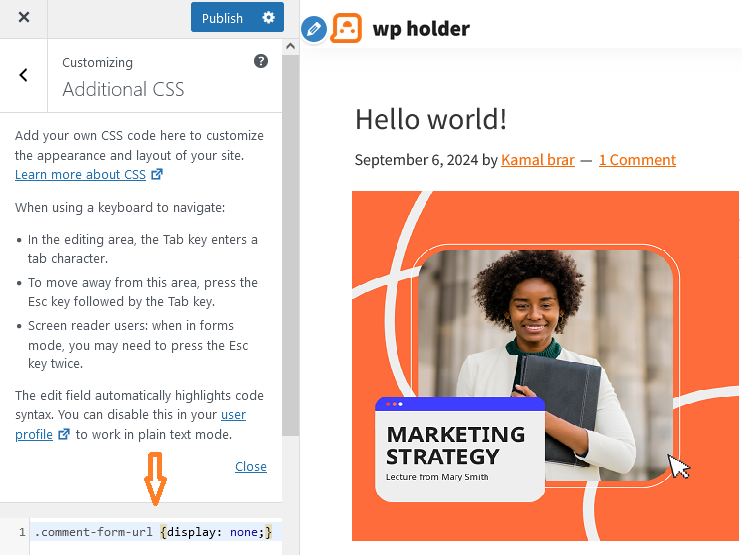
If you can’t find the customize option then no need to worry, just paste this code in your theme CSS file. Remember please take backup or CSS file before pasting, you can revert if something goes wrong.
Remove URL Field From WordPress Comment Form Manually
There are many benefits of completely removing WordPress comment URLs, Removing the comment URL field prevents users and spam bots from posting website URLs, as removing the URL field also removes it from the system.
Some users would also like the comment URL field to be removed completely instead of just hiding it, here we are going to explain how to remove the comment URL from the WordPress comment form.
before we begin, please backup your WordPress so that if something goes wrong, you can restore the backup.
So now all you need to do is copy the below code and paste it in the ‘functions.php’ file of your WordPress theme.
    add_filter('comment_form_default_fields', 'website_remove');
    function website_remove($fields)
    {
    if(isset($fields['url']))
    unset($fields['url']);
    return $fields;
    }
After pasting the code click on update file. Open your website in incognito window and view the comment section. URL field is permanently removed.
Delete WordPress comment URL field (via plugin)
It is best for beginners to solve their problems through plugins. You can choose the method you like best.
If you want to remove the WordPress comments URL field using a plugin then you need to install the plugin first.
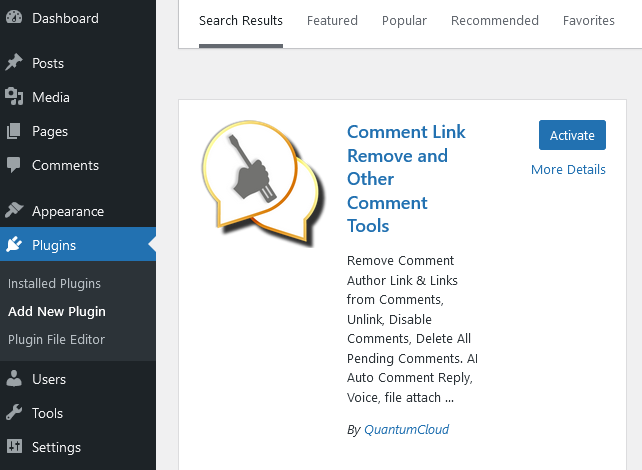
Go to Plugins » Add New Plugin and Search ‘Comment Link Remove and Other Comment Tools’, download and Activate the Plugin. Read: How To Install WordPress Plugin
After activation, you will see a new menu item called “Comment Tools” in the left sidebar of your WordPress dashboard. Clicking on it will take you to the plugin setting page.
Now all you have to do is check the box next to the “Remove website field from comment form” option.
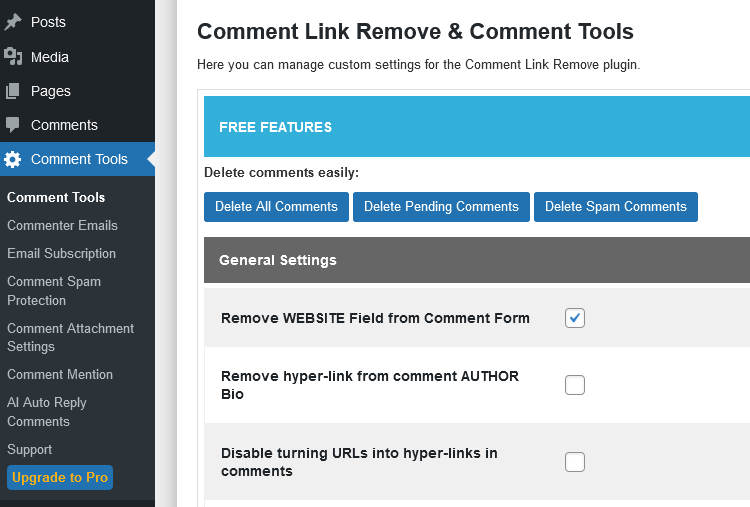
Once done, you have to scroll to the bottom of the page and click on the Save Changes button to apply settings.
Now go to the incognito window and open any post of your WordPress and see the comment section, the URL field has been removed from there.
I thank you for reading this article and hope it helped you learn how to remove the website URL field from the WordPress comment form.
If you have any problem then please feel free to ask in the comment section.
