
If you are thinking about creating a website or a blog, you have surely heard the term “domain name.” So, you might be wondering what a domain name is.
Simply put, a domain name is just like a personal name; just as you are known by a specific name, your website or blog is known by its domain name.
So, what exactly is a domain name? It might sound technical, but I assure you, it is not. After reading this guide in full, you will understand domains so well that you will be able to explain them to others, too.

What You’ll Explore in This Guide
- What is a Domain Name? The Simple Answer
- How Does a Domain Name Actually Work?
- The Structure of a Domain Name
- Types of Domain Extensions (TLDs) Explained
- Domain Name vs Web Hosting – What’s the Difference?
- Domain Name vs URL vs Website – Clear the Confusion
- How We Chose the Domain Name for WPHolder
- How to Choose the Right Domain Name
- How to Register a Domain Name – Step by Step
What is a Domain Name? The Simple Answer
Let’s start with the most basic question: what exactly is a domain name?
A domain name is the human readable address of a website on the internet. It is what you type into a browser to visit a site. For example : google.com, wikipedia.org, and wpholder.com are all domain names.
Basically, every website on the internet resides on a server. That server has a numerical address known as an IP address, and it looks something like this: 192.168.1.254.
Can you imagine having to remember a long series of numbers every time you visit a website? Absolutely not. That is why domain names exist. They give every website a name that is easy to read and remember, while computers handle the task of connecting them behind the scenes.
So, Instead of typing an IP address, you use a simple name like wpholder.com. Your computer then converts this name into the correct IP address and loads the website.
How Does a Domain Name Actually Work?
Let’s take a look at what actually happens when you type a domain name into your browser. It is one of those things that might sound complicated, but once clearly understood, it seems completely simple and logical.
Simply, Take a look to Screenshot
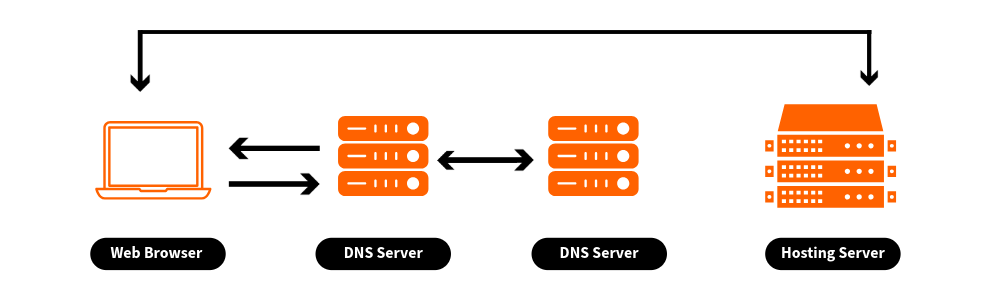
When you type a domain name like wpholder.com or google.com or any other domain into your web browser and press Enter, all of this happens behind the scenes in a tiny fraction of a second :
Your browser asks the DNS
Your browser sends a request to a system called the ‘Domain Name System’ (DNS) think of it as the Internet’s giant phone book. It asks, “What is the IP address of wpholder.com?”
DNS looks up the answer
The DNS checks its records and finds the IP address linked to wpholder.com. This record is called an
A Record
– it maps your domain name to the server’s IP address.
Your browser connects to the server
Upon obtaining the IP address, your browser connects directly to the web server where the website’s files are stored.
The server sends back the website
Your browser contacts the website’s hosting server using that address and asks for the site’s content. The hosting server sends the data back, and your browser turns it into the web page you see on your screen.
Simply Put : you type a name, DNS translates it into an address, and your browser fetches the page from that address – all in a fraction of a second.
The Structure of a Domain Name
Let’s understand the domain name by breaking it down into different parts. Once you understand its structure, the rest of the things about domains also become easier to understand.
Take a look at this example
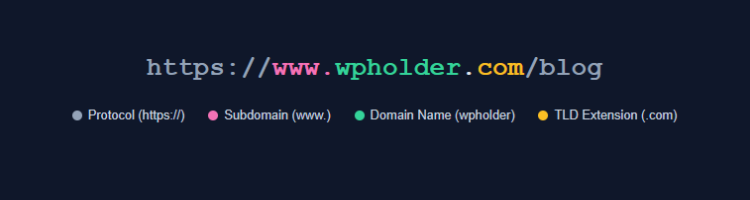
Let’s understand each part so you know exactly what it does :
The Protocol – https://
This tells your browser how to connect to the website. HTTPS means the connection is secure and encrypted. You should always use HTTPS for your website. when it is active modern browsers show a padlock icon. It is not part of the domain name, but it always appears with it in the full URL.
The Subdomain – www.
The www is actually a subdomain. Subdomains are prefixes that sit before your main domain name. However, ‘www’ is just a trend; your website works perfectly fine without it as well.
Furthermore, you can create your own subdomains for specific purposes, like shop.wpholder.com for a store or blog.wpholder.com for a blog section.
The Domain Name – wpholder
This is the core part, the name you actually register and own. It is your unique identity on the internet. No two websites can have the same domain name with the same extension. This is the part that costs money to register and renew each year.
You can use letters, numbers, and hyphens in a domain, but not spaces or special characters. Since they are not case-sensitive, Example.com and example.com are treated the same.
The TLD (Top Level Domain) – .com
A TLD is the extension at the end of a domain name. While .com is the best known, hundreds of other options exist. We will talk about them in detail in the next section, because they are much more important than beginners believe.
Types of Domain Extensions (TLDs) Explained
When we register a domain, we choose not just a name but also an extension the part that comes after the dot. This extension is called a Top Level Domain (TLD).
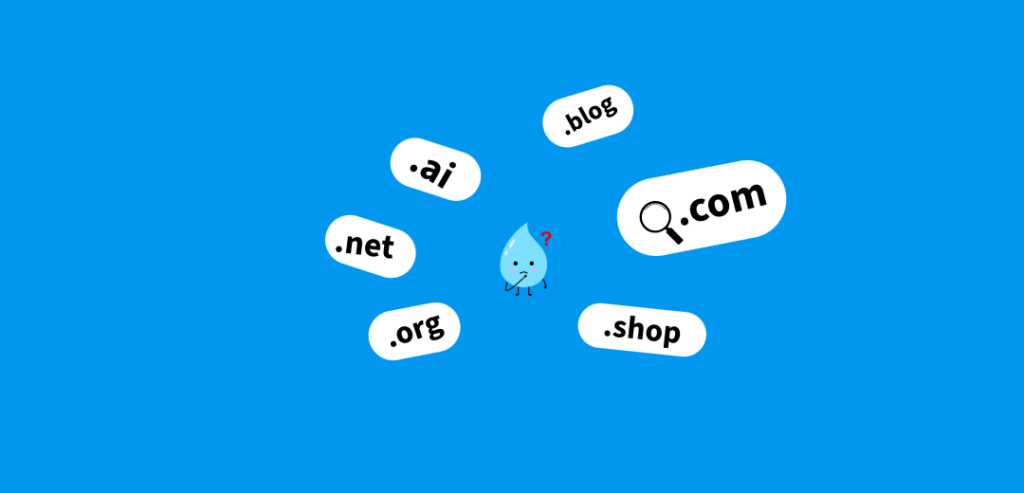
Domain names come in many types of extensions. While .com remains the top choice worldwide, other popular options like .ai, .org, .net, and .io are also available to register. Generally, it is a good idea to use a .com domain extension for better brand recognition.
Let’s go through the main categories so you can make a smart choice.
| Extension | Type | Best Used For |
|---|---|---|
.com | Generic TLD | Businesses, blogs, and websites of all kinds, the most trusted extension worldwide |
| .org | Generic TLD | Non-profits, open-source projects, community organizations |
| .net | Generic TLD | Tech companies, networks is a good alternative if .com is taken |
.co.uk, .in, .de | Country Code TLD (ccTLD) | Businesses targeting a specific country or region |
| .io | Tech TLD | Startups and tech products – widely used in the tech industry |
| .store / .shop | New TLD | E-commerce businesses and online stores |
| .blog | New TLD | Dedicated for blogging websites and content creators |
| .edu | Sponsored TLD | Accredited educational institutions only |
| .gov | Sponsored TLD | Government websites only — not available to the public |
So, which extension should you choose? My straightforward advice always go for .com first. It is the most recognized and trusted extension, when people guess a website address, this is the extension they type first. If your preferred .com name is already taken, consider .co, .net, or a country-specific extension (such as .co.uk) based on your audience.
Domain Name vs Web Hosting – What’s the Difference?
Beginners often have several questions, and one of them is what is the difference between a domain and hosting?

So, let’s clear this up once and for all.
Domain names and web hosting are two completely different things, but you need both for a functional website.
Practically speaking, they differ as follows :
- Domain name : A domain name is not the website itself. The domain is the address people use to access your site.
- Web hosting : Web hosting stores a website’s files and its content. When someone types your domain (like wpholder.com) into their browser, the internet finds the web hosting server linked to your domain where your site is stored, and then shows the website to the visitor.
For example, wpholder.com is our domain name, and its domain registrar is GoDaddy. However, the actual website files are stored on a web hosting server. For this, we use Bluehost to host our website.
You can buy both from the same company, which is convenient and what most beginners do. Alternatively, you can register your domain with one company and your hosting with another and then “point” the domain to the hosting using DNS settings.
Domain Name vs URL vs Website – Clear the Confusion
Before moving forward, let us understand three terms that often confuse beginners. Although these terms are interconnected, they have distinct meanings.
| Term | What It Is | Example |
|---|---|---|
| Domain Name | The registered name and extension that identifies your site | wpholder.com |
| URL | The full web address including protocol, domain, and page path | https://www.wpholder.com/blog/what-is-wordpress |
| Website | The actual collection of pages, content, and files people visit | All the pages and posts on WPHolder |
| Web Hosting | The server where the website files are stored and served from | A Bluehost or Hostinger server |
| IP Address | The numerical address of the server – what DNS translates your domain to | 192.168.0.1 |
Basically, your domain name is the part of your URL that takes visitors to your website, this website lives on your web hosting, which is located at a specific IP address. They are all linked, but they are not the same thing.
How We Chose the Domain Name for WPHolder
Now, instead of just giving you theory, I’m going to show you a real-world example of domain name decisions. I will walk you through exactly how we picked the domain name for WPHolder.
When we started our site WPHolder, we wanted a .com domain right from the very beginning. As I mentioned earlier, .com is the most trusted and widely recognized extension, and trust matters a lot for a professional WordPress resource site.
Next, We also gave thought to the name. We wanted something that clearly explained what we do: helping people build, maintain, and manage WordPress websites.
The word “Holder” represents ownership and control, which are the core values of everything we teach. Combined with “WP” (the shorthand for WordPress that the community instantly recognizes), the name “WPHolder” felt like the right fit.
The WPHolder Domain: What We Looked For
- Short and memorable – easy to say, easy to type, easy to remember
.comextension – for maximum trust and recognition- Relevant to what we do – WP + Holder clearly reflects we are using WordPress
- No hyphens, no numbers – clean and professional-looking
- Easy to spell – no one needs to ask “is that with a ‘ph’ or an ‘f’?”
After that, Completing the WordPress installation process, the first thing we did was connect the domain to our hosting account via DNS settings. Within just a few hours of propagation, our site would load whenever wpholder.com was typed into any browser, anywhere in the world.
Seeing my website, WPHolder.com, up and running for the first time was a fantastic experience, you will truly feel the same when your own WordPress site goes live and you see it for the first time.
That’s the real world process and it is simpler than it sounds. We will walk you through exactly how to do it in the next sections.
How to Choose the Right Domain Name
Choosing a domain name is one of the most important decisions you will make for your website. Unlike your theme or your content, your domain is not something you want to change later, it affects your branding, your SEO, and how people remember you.
So let’s get it right from the start.
Keep It Short and Simple
The shorter the domain, the easier it is to type, remember, and share verbally. Aim for one or two words maximum. Long domain names are hard to say out loud and are easy to misspell.
For instance, wpholder.com is far better than myfantasticwordpresswebsiteholder.com.
Make It Easy to Spell and Pronounce
If you have to spell it out every time you tell someone your domain, that’s a red flag. Avoid unusual spellings, silent letters, or words that have multiple common spellings. Your domain should be such that if someone hears it, they can type it correctly without any explanation.
Avoid Hyphens and Numbers
We should avoid using numbers and hyphens in domain names. These can confuse users and make the domain name difficult to remember.
Use Keywords Wisely, but do not force it
Including the right keywords in your domain name can aid SEO, but avoid keyword stuffing. A natural sounding domain like wpholder.com is better than a forced, keyword heavy name like bestwordpresshostingsite.com. Relevance matters, but readability is equally important.
Choose .com Whenever Possible
As I mentioned earlier, .com is considered the best and most trusted extension. If your preferred .com name is already taken, try making a slight modification to the name instead of choosing a lesser known extension.
Check for Trademarks
Before registering a domain, quickly check to ensure you are not accidentally using a trademarked brand name. Using a trademarked name can lead to legal issues and force you to give up your domain later, which can be painful situation.
How to Register a Domain Name ?
Now that you know what makes a great domain name, let’s talk about how to actually register domain. The process is very simple and usually takes between 5 and 10 minutes to complete from start to finish.
Choose a domain registrar
A registrar is a company authorised to register domain names. Popular and reliable options include
Namecheap
,
Google Domains
,
GoDaddy
, and
Cloudflare Registrar
Many hosting providers like SiteGround and Bluehost also offer domain registration and will sometimes throw in a free first year with a hosting plan.
Search for your domain name
Now, Go to website of your preferred registrar and type your desired domain name into the search bar. The registrar will instantly let you know whether it is available, and if it has already been taken, it will show you other options as well.
Add to cart and review the price
Domain prices vary based on the extension. Typically, a standard .com domain costs between $8 and $15 per year. Be cautious about initial prices some registrars display a low price for the first year but charge more at the time of renewal.
Enable WHOIS privacy protection
When you register a domain, your personal contact information is added to a public database called WHOIS. Most registrars offer privacy protectioneither for free or for a low costto keep your personal details hidden.
Complete your purchase
Follow the instruction, Create an account with the registrar, enter your payment details, and complete the registration. You will receive a confirmation email, and the domain will now be officially registered in your name.
Point your domain to your hosting
After registering, you need to connect your domain to your web hosting. You do this by updating the Nameservers or point the Ip address .
Now, Go ahead and register your domain name. The best time to secure it was yesterday, and the second-best time is right now.
Thank you for Reading.
Also Read: How to Install WordPress on Localhost – A Complete Guide
