
Your domain name is the very first thing people see before reading a single word of your content. Make sure to get it right from the start, as changing it later can impact your rankings, customer trust, and your peace of mind.
Honestly, when I started wpholder, I spent three full days just deciding on the domain name. I was constantly overthinking and doubting myself. What if I pick the wrong name and regret it later?
All beginners go through this stage. Choosing a domain name seems like the most important decision in the world when you start. However, once you understand the key factors, it is not really that difficult.
So, in this guide, I am going to share 10 tips that will truly help you find a memorable, brand worthy name one that will grow alongside your business.

What is a Domain Name? A domain name is basically your blog’s home address on the internet. Just like your house has a street address so people can find it, your blog has a domain name so readers can find you. For example, google.com is Google’s domain
In This Article
- Always go with .com
- Keep it short
- Say it out loud first
- Make It Easy to Spell
- Make It Easy to Remember
- Add a keyword the right way
- Avoid Numbers and Hyphens
- Check if the domain is available ?
- Research It Before You Register It
- Register it today
Go with .com
The extension is the ending part of your domain – like .com, .net, or .org. This part matters more than most people think.
Most importantly, choose .com whenever possible. It is the world’s most popular and trusted extension. When people hear a website name, .com is the first thing that comes to mind; therefore, it enhances your site’s credibility.
For instance, if you tell someone they can buy a discounted cloth from our website ‘rowclothing’ and they type ‘rowclothing.com’, they will see a “site not found” error in their browser. If you are using .biz, .blog, .net, or any other extension instead of .com, you will lose that visitor forever.
That’s why we always recommend going with a .com domain name rather than other extensions. It’s still the most established and trusted extension on the web.
Keep It Short
First of all, always keep your domain name short. A short name is easy to say, easy to spell, and easy to remember.
So, in reality, which would you prefer to type: ‘bestcookingrecipes.com’ or ‘cookrecipes.com’? A shorter name is always better.
A good rule of thumb is to keep your domain name under 14 characters. The shorter the name, the easier it is to type and remember, and the less likely it is to be mistyped.
The top internet sites are Google, Apple, Amazon, Facebook, and YouTube. They are all short, impactful, and instantly recognizable. However, these companies did not become famous because of their domain names.
Therefore, whenever you come up with a domain idea, make sure to count the characters, as experts say a good domain name should have between 6 and 14 characters.
Say it out loud first
Here is a test most bloggers ignore, say your domain name out loud to someone who has never seen it written. If they immediately ask you to spell it, that is a red flag.
So, if you intend to use a domain for a professional email address, it is even more important that it be easy to pronounce. When you say over the phone, “Contact me at hello@[yourdomain].com,” you want the other person to be able to spell it correctly on the very first try.
‘Word of mouth’ costs nothing, but it only works if people can repeat your domain name after hearing it just once. Whether someone mentions your blog at dinner, in a meeting, or on a podcast. the easier the name, the further it will spread.
Some names that don’t work :
- Lyf – people will type “life” and land on a different site
- Knwldge – missing vowels, impossible to read out loud
Names that just work :
- Mailchimp – hear it once, remember it forever
- Shopify – clear, clean, easy to spell
- Buffer – one simple word, zero confusion
Make It Easy to Spell
Easy to say and easy to spell go hand in hand, but they are not exactly the same thing. A name can sound fine but be a spelling nightmare.
Avoid using creative or “fun” spellings. I know they sound smart, like writing “Bloggr” instead of “Blogger” or “Wriite” instead of “Write.” They may seem cool to you, but they actually cause confusion.
Someone hears your domain name, tries to type it, and ends up on a blank page because they used the standard spelling.
Similarly, pay attention to words that have more than one common spelling, such as “colour” vs “color” or “theatre” vs “theater.” You may end up competing against yourself, or worse, half your readers could end up on a completely different site.
Type your domain idea into a search engine and see what comes up. If similar spellings already exist as active websites, that is a sign to rethink your choice.
Make It Easy to Remember
Additionally, your domain name should be one that people can easily remember. Keep names like zoom.com, snap.com, or bing.com, as such names are short, impactful, and very easy to recall.
So, how do you make a domain name memorable? Here are some easy ways :
- Use words that sound fun or interesting
- Try rhyming names (like MailChimp)
- Use alliteration – same starting letter (like BestBuy or CocaCola)
- Pick a word that connects to your niche
Moreover, when a name connects to what you do, people remember it naturally. For example, if you sell shoes, a name like ShoeStop.com is much easier to recall than XYZ123.com.
Build in a Keyword – But Don’t Force It
Adding a relevant keyword to your domain name is a good idea. It helps search engines understand what your website or blog is about.
For instance, if a travel blog’s domain name includes the word “travel” it clearly signals to both readers and Google what to expect. This little hint might give you a slight advantage in search results.
However, there is a fine line between useful and overdone. A domain name stuffed with keywords like “bestbudgettraveltipsblog.com” it looks spammy, untrustworthy, and is impossible to remember.
Instead, consider how you can incorporate a natural keyword into a name that feels human and brand like. For a food blog, you could combine a keyword with a creative term or the blogger’s name (such as “PinchOfSpice”). This maintains the keyword’s context while giving the name a unique identity.
When we were choosing the name “WPHolder” we did not just pick a random word and add “WP” to it. As you know “WP” is commonly used for WordPress, since we provide WordPress related services, we included it in the name.
Additionally, the “WP” keyword plays a vital role. Within the WordPress community, anyone who sees it immediately understands the site’s niche; no further explanation is required.
So the name works on two levels at once. “WP” signals the niche. “Holder” gives it a personality. Together they feel like a brand, not a keyword list.
Avoid Numbers and Hyphens
This tip is simple but crucial: never use numbers or hyphens in your domain name. Why? Because they cause confusion.
For example, suppose your domain is top10recipes.com. When you tell this to someone, they wonder whether they should type the number “10” or write out “ten.” It is precisely this small doubt that leads them to the wrong site.
Similarly, hyphens can also cause issues. If your domain is best-recipes.com, people often forget to include the hyphen and end up at bestrecipes.com instead. That site might belong to a competitor.
So, stick to plain letters only. No numbers. No hyphens. No symbols of any kind.
Check if the domain is available ?
Before you fall in love with a domain name, Check if it is not already Taken. Many great names are already taken. So, always search first before you get attached to a name.
You can check availability easily on these websites :
- Namecheap.com – Fast and simple to use
- GoDaddy.com – Very popular domain registrar
- Google Domains – Clean and straightforward
Now, Simply visit any of the websites listed above and search for your desired domain name in the search bar to check availability.
Research It Before You Register It
Hopefully the domain you want is available, but wait, don’t pay for it right now.
First, do a trademark search. You can search for free on the USPTO website in the US. If you live elsewhere, check your own country’s trademark website.

Why does this matter? Because if someone else legally owns that name, you could lose your domain later. And trust me, rebranding your whole website is a very difficult and painful task. Nobody wants that.
Next, do a quick Google search. Just type in your domain idea and see what comes up. If a popular blog, business, or person is already using that name, think again. You don’t need a legal issue to have branding problems, people get confused easily, and confused people don’t return.
Also, check your social media presence.
Go to Instagram, X, YouTube, and Facebook. Search for your name on all of them. Try to make your website name and social media handles the same, or at least similar enough so people can easily find you everywhere.
Register It Right Away
Finally, once you find the perfect domain name, do not wait. Register it immediately, because domain names sell quickly. Someone else could buy your preferred name while you sleep.
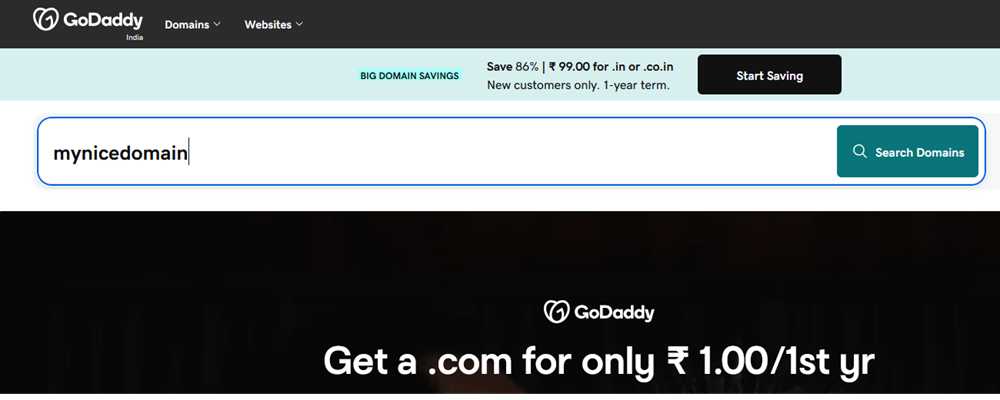
The cost of domain registration typically ranges from $10 to $15 per year. This is a very low price for something so essential. In fact, it is one of the best investments you can make when starting a website.
Here are the most trusted places to register your domain :
- Namecheap – Affordable prices and free WhoisGuard privacy
- GoDaddy – Most popular registrar in the world
- Cloudflare Registrar – No markup, very transparent pricing
- Google Domains – Simple and reliable
And when you find it, register it today.
If you find this guide helpful, share it with someone who is starting their website. And if you have questions, drop them in the comment box below, I am happy to help !
Once you have registered your domain name, the next step is the server where your website will actually be hosted. Check out our guide on choosing the Best WordPress hosting for beginners.
